
Are your domain's emails getting through? We'll tell you for free.
We check the DNS records you need to send email (SPF, DKIM, DMARC and MX) and email you a report in English on what to fix.
- Free, no card needed
- No access to your DNS
- Report in English, by email
The four records that decide whether an email gets accepted
They're the same ones Gmail, Outlook and Yahoo read when they receive your email. If one is missing or wrong, the email ends up in spam or gets rejected.
Who can send
The list of servers allowed to send email for your domain. There must be only one, and it must stay within the 10 DNS lookup limit.
The signature
A digital signature that proves the email really comes from you and wasn't changed along the way.
The policy
Tells providers what to do with emails that fail the checks, and protects recipients from anyone using your domain without permission.
Where your mail arrives
The server that receives the domain's mail, and whether there's a spam filter in front of it to keep in mind.
What you get by email
- For each record: how it looks today, what's missing and why it matters.
- The exact text to copy into your domain's control panel, whatever your provider.
- Fixes in order of importance: first whatever is sending your emails to spam.
- Questions? A real person on the team replies to your email.
Three steps, no access to your DNS
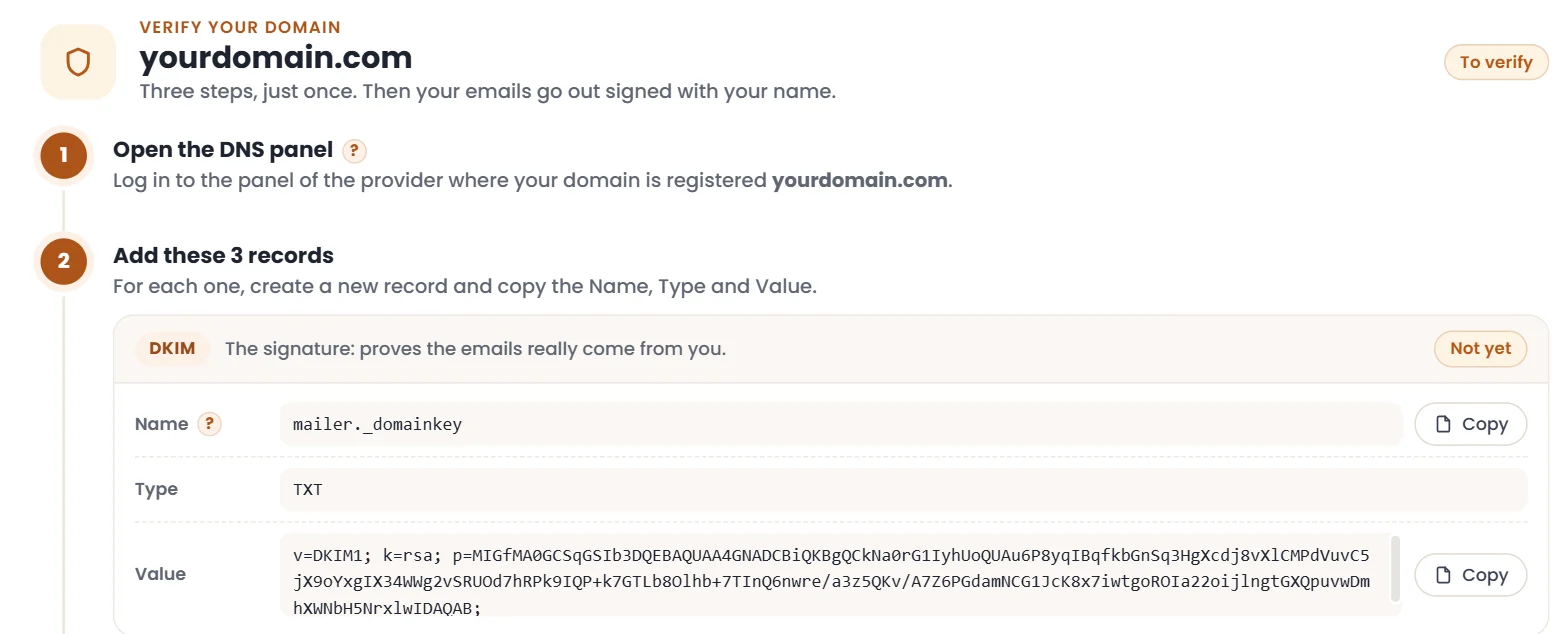
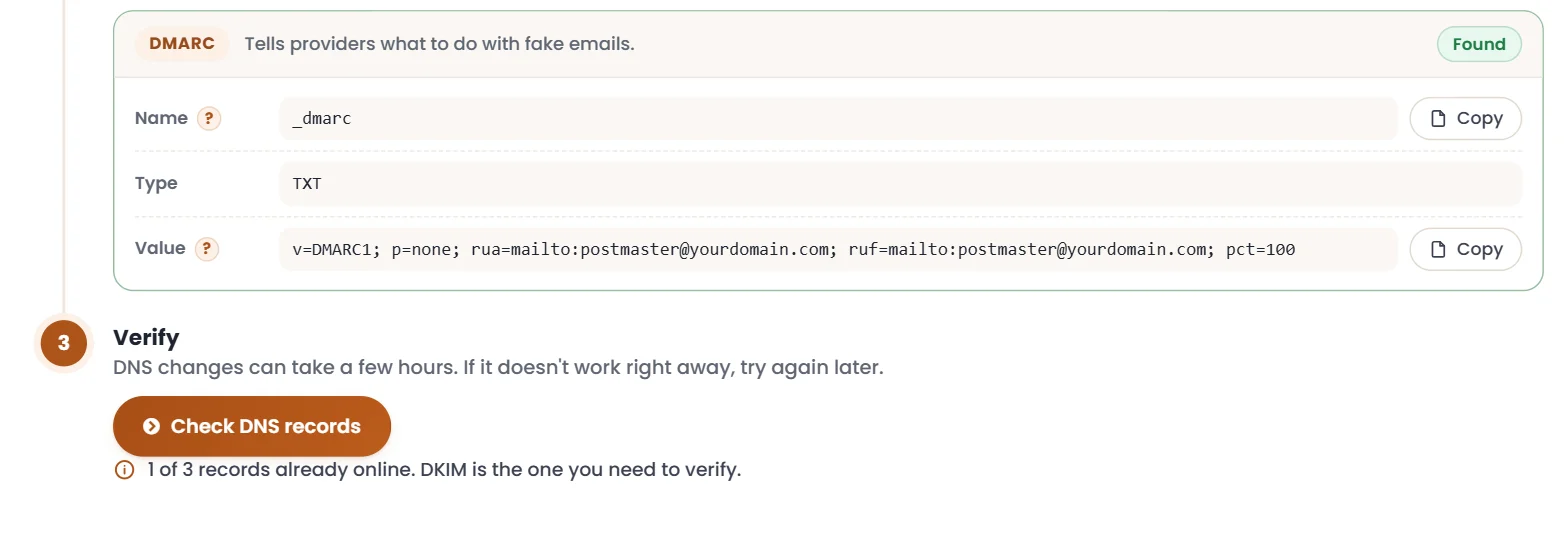
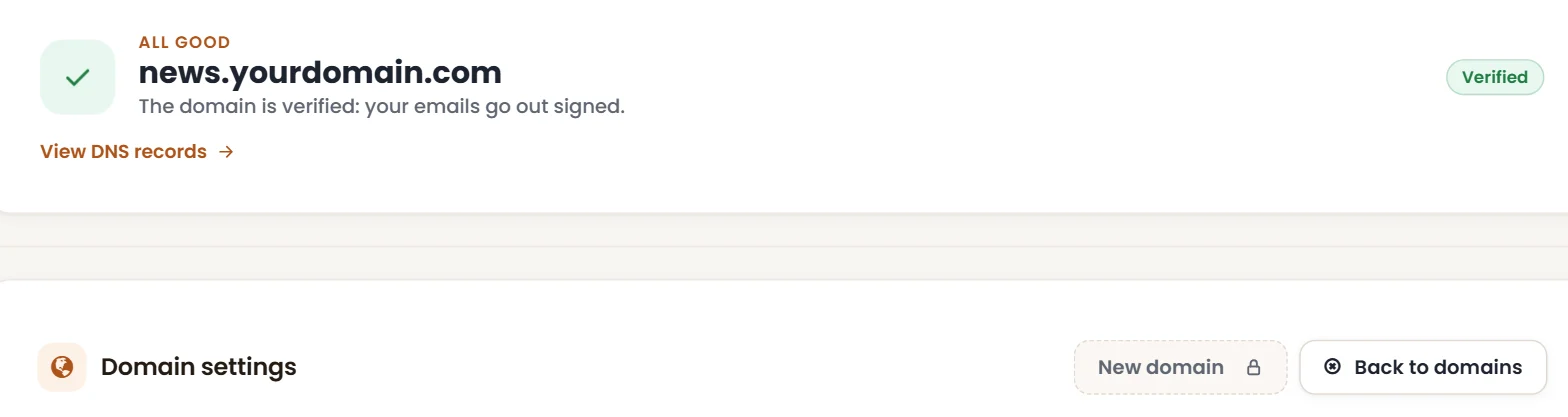
And if you then send with SMTP Senpai, this is what domain verification looks like: real screenshots, example domain.
Enter your domain
The one your emails come from: your website, app or business software.
We read the records
Only the public ones, the same ones Gmail, Outlook and Yahoo read when they receive your email.
Get the report
For each record: how it is, what's missing and what to enter to fix it.
Support from real people
We are really happy with MailSenpai's services because they understood our specific email marketing testing needs effectively and efficiently. As we are not experts, their Support Team trained our staff to use the tools, in a timeframe that worked for everyone. […]
EVERYTHING! Easy to use, innovative and complete features, and above all the customer service and the dedicated coach! I strongly recommend this provider to anyone who wants to perform and scale their business!!!
A great ally for effective email campaigns
I've been using MailSenpai for several months and I'm very happy with it: it's intuitive, fast and perfect for running effective email campaigns. The automations and detailed statistics help me save time and improve my results. Recommended!
My new experience with mailsenpai…
My new experience with mailsenpai has been excellent. I was carefully guided through every step, from purchase to scheduling. They are true professionals in the field.
Positive experience with Mailsenpai!
An absolutely positive experience! […] The speed of sending campaigns and how easy it is to find and read the statistics certainly play a key part, as does the effectiveness of the support team, always very helpful and attentive to business needs. I recommend it wholeheartedly!
The email marketing service I was looking for
The added value? The team! Always available and very quick to reply, which is rare in this industry. I got dedicated support to optimise my campaigns and the results showed straight away: more engagement, more conversions and optimised delivery!
Top platform for email marketing
We've been using this platform to send our newsletters for 4 years now. Besides working and performing perfectly, it gives us the most helpful support for fine-tuning every setting and for any problem or question. Recommended!!
Fast, timely support
Fast, timely support. Excellent!
Reliability, professionalism, listening and understanding the problem: excellent support.
Frequently asked questions
How much does it cost?
Nothing, and no card needed. We only ask where to send the report.
Do I need to give you access to my DNS or domain control panel?
No. We only read the public records, the ones anyone in the world can look up. You, or whoever manages the domain, make the fixes by following the report.
Does it work with GoDaddy, Namecheap, Cloudflare or OVH?
Yes: SPF, DKIM and DMARC records are the same with any provider. Only the panel where you enter them changes.
What are SPF, DKIM and DMARC, in plain words?
SPF says which servers can send on behalf of your domain, DKIM adds a signature that proves the email is yours, and DMARC says what to do with emails that fail these checks. Since 2024 Gmail and Yahoo have required them from anyone who sends a lot of email.
Why are my emails rejected with “554 5.7.1”?
It's a rejection from the receiving server: it often happens when the domain isn't properly authenticated or the server you send from isn't authorised. The report tells you whether the problem is in your DNS records and how to fix it.
Can I check a domain that isn't mine?
The check only reads public data, but the report is useful to whoever can fix the domain: use it for yours or for a client's domain you look after.
What if the records are wrong?
The report tells you what to enter. And if you want your website or app emails to go out through a service that also looks after delivery, there's SMTP Senpai, MailSenpai's SMTP relay, with a 14-day trial.
See what Gmail and Outlook see when they receive your email
- Free, no card needed
- No access to your DNS
- Report in English, by email