

In this article (8)
Substantially reviewed on 3 November 2026. An SMTP server or SMTP relay service accepts outgoing messages from your app, website or business softwareThe term software refers to the intangible components of an electronic system … More and attempts onward delivery. Choose it by your sending pattern, daily limits, troubleshooting history and total cost, rather than a headline price alone.
Disclosure: MailSenpai operates SMTP Senpai. It appears alphabetically in the same comparison as the other providers. This guide compares published terms; it is not an independent inbox-placement test or a ranking of the cheapest services in every market.
What an SMTP relay does
Your softwareThe term software refers to the intangible components of an electronic system … More submits a message using the provider’s SMTP host, port and credentials, or calls its HTTP APIThe acronym API (short for Application Programming Interface) refers to a set of programming rules... More. The provider then handles onward delivery. A positive submission response is different from acceptance by the recipient’s server, and neither establishes whether a message appears in Inbox or SpamSpam is unwanted messaging: messages sent, often repeatedly, to recipients who never asked to receive... More. See RFC 5321 for SMTP response semantics.
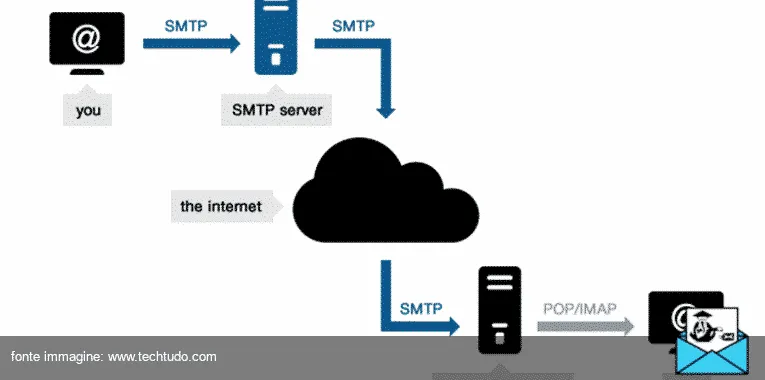
SMTP, a mailbox and a campaign platform serve different needs
A relay is the sending transport. It does not automatically give your team an inbox for receiving replies, nor replace a newsletter editor, contact databaseA database (DB for short) is a kind of highly advanced digital filing cabinet: an... More or campaign automation. Keep a monitored Reply-To address where replies matter; the no-reply and Reply-To guide explains the distinction. MailSenpai’s newsletter platform and SMTP Senpai are separate products.
Compare the constraints before the price
- Your real workload: monthly volume, busiest hour and largest burst. A reset-password message cannot always wait behind a scheduled bulk send.
- Limits and approval: free plan versus expiring trial, sender-domain verification, daily caps and what happens at a quota boundary. Do not assume every provider requires a card.
- Evidence when something fails: message-level logs, remote response, retention and export. An analytics report is not necessarily the original message or full delivery log.
- Operational fit: supported SMTP/TLS ports, APIThe acronym API (short for Application Programming Interface) refers to a set of programming rules... More features you actually use, bounce and complaint handling, support channel and response commitment.
- Location and contract: check the processing region, data scope and relevant terms. A provider’s headquarters or an EU endpoint alone does not describe every data flow.
SMTP service prices and limits: November 2026
The table uses the provider’s published currency. Brevo is the Italian configurator in EUR, not a US or UK quote. Plans containing 15,000, 20,000 or 50,000 messages are identified as such; they are not presented as if they cost proportionally less for a 10,000-message subscription. On a phone, scroll the table horizontally.
| Provider | Free plan or trial | Paid plan and billing | Logs, support or another constraint |
|---|---|---|---|
| Amazon SES | Pay as you go; eligible new-customer AWS credits have their own terms and expiry. | Essentials: $0.16/1,000 emails; à la carte: $0.10/1,000. Data and optional features can add charges. | Sending charges are separate from setup, monitoring and other AWS services. |
| Brevo | Up to 300 emails/day after account approval; no card to sign up. | Starter 10,000: €14/month billed monthly; €12.67/month equivalent with annual billing. Italian EUR configurator. | Marketing and transactional sends share the allowance; check contact limits and brandingBranding is a marketing term. It refers to the set of activities and operational strategies... More add-ons. |
| Lettermint | 300 emails/month, no card. | Starter: €10/month for 10,000; extra emails €1.50/1,000. | Starter: five domains and basic support; provider states EU-based infrastructure. |
| Mailgun | Free: 100 emails/day, one custom domainIn technical terms, a domain name is the address used to visit a specific website.... More and one-day logs. | Basic: from $15/month for 10,000; extra emails from $1.80/1,000. | Basic retains one-day logs; US/EU region selection is available. |
| Postmark | 100 emails/month, no expiry. | Basic: $15/month for 10,000; extra emails $1.80/1,000. | Basic: 45-day data retention; separate transactional and broadcast streams. |
| Qboxmail Email Delivery | 5,000 emails/month on an ongoing free plan. | 10,000 emails: €7/month on a monthly subscription. | Separate plans per sending user; domains require verification and approval. |
| Resend | Transactional: 3,000 emails/month, capped at 100/day. | Pro: $20/month for 50,000; extra emails $0.90/1,000. This is not a 10,000-email plan. | Transactional pricing lists 30-day data retention; marketing pricing is separate. |
| SendGrid | 60-day trial, 100 emails/day, no card. | Essentials: from $19.95/month; 50,000–100,000-email range, depending on selected volume. | Essentials: three days of searchable email activity; additional history is a paid option. |
| SMTP Senpai | 5,000 emails/calendar month, 200/day, 30 in the preceding hour; no card or expiry. | 10,000: €12.90/month + VAT on the annual plan; €25.80/month + VAT on the three-month plan. | One verified domainIn technical terms, a domain name is the address used to visit a specific website.... More on Free; seven-day free logs, 90 days on paid plans; EU servers and data. |
| Sweego | 100 emails/day; seven-day logs. | Individual: 20,000 emails for €10/month excluding tax with monthly billing; €8/month equivalent annually. | Individual: 30-day logs and chat/email support; overages available. |
| turboSMTP | 200 emails/day for the first six months. | Basic: €14.95/month, billed monthly, for up to 15,000 emails. | Basic: 30-day analytics and chat/ticket support; prepaid credits have an expiry. |

Three checks that change the decision
- Check bursts as well as totals. Illustrative example: 4,000 monthly notifications fit below a 5,000-monthly allowance, but 40 messages submitted together exceed a cap of 30 in the preceding hour. Check your app’s queue and the provider’s limit behavior before choosing.
- Compare the bill and the commitment. Include overages, extra domains or IPs, taxes and engineering time. For example, €12.90 × 12 = €154.80 + VAT is the annual equivalent of SMTP Senpai’s 10,000-email plan, not a monthly-commitment offer. SES’s low sending unit price excludes other items you may enable.
- Match retention to support delays. If an issue is reported ten days later, one-day logs cannot reconstruct it. Compare the exact retained data, not only the label “analytics”. Mailgun Basic lists one-day logs; Postmark Basic lists 45-day data retention; SMTP Senpai lists seven-day free logs and 90-day paid logs. These descriptions do not establish identical data scopes.
How to narrow the shortlist
For a small project, first compare a continuing free plan with its daily and hourly caps. Qboxmail and SMTP Senpai both list 5,000 messages per month, but that shared number does not make their approval process, bursts, logs or support identical. A time-limited SendGrid or turboSMTP trial serves a different purpose from an ongoing free plan.
For a developer maintaining sending infrastructure, compare SES’s metered cost with the operational work and add-ons you need. Mailgun offers US/EU region choice. Postmark supports separate transactional and broadcast streams; describing it as transactional-only would miss a documented feature. For a multi-channel marketing workflow, check whether Brevo’s shared allowance and contact limits fit your combined workload. Resend publishes distinct transactional and marketing pricing.
This is a shortlist method, not a compatibility certification. Before migration, confirm the provider’s terms and supported features for your softwareThe term software refers to the intangible components of an electronic system … More. If you already have a failed send, follow the 554 5.7.1 diagnostic guide before assuming a new provider will fix the cause.
Where SMTP Senpai fits
SMTP Senpai sends app and website email through EU servers. Connect with SMTP on port 587 or 2525 using STARTTLS, or use the documented APIThe acronym API (short for Application Programming Interface) refers to a set of programming rules... More. The free plan includes one verified sending domainIn technical terms, a domain name is the address used to visit a specific website.... More, up to 5,000 messages per calendar month, 200 per day and 30 in the preceding hour, with detailed logs for seven days. It has no card requirement or expiry. Confirm your account email and verify a domainIn technical terms, a domain name is the address used to visit a specific website.... More you control before sending.
Paid plans start at €12.90/month + VAT for 10,000 messages on the annual plan; the three-month plan is €25.80/month + VAT. Paid logs are retained for 90 days. The free plan does not automatically become paid, and no plan described here promises unlimited sending or guaranteed inbox placement. Check current terms on the SMTP Senpai service page.
At the quoted volumes, Qboxmail and Lettermint have lower subscription prices than our annual equivalent. Your choice should reflect workload, retention, location and support needs, not an unsupported claim that our service is universally cheapest. Start with the free SMTP Senpai plan if those limits fit your app and you can verify a sending domainIn technical terms, a domain name is the address used to visit a specific website.... More.
Frequently asked questions
Does changing the SMTP server guarantee Inbox delivery?
No. Submission, recipient-server acceptance and mailbox placement are separate stages. DomainIn technical terms, a domain name is the address used to visit a specific website.... More authentication, recipient policy and your sending practices still matter.
Is the cheapest rate per thousand the cheapest service for me?
Not necessarily. Compare the minimum subscription, commitment, overages, tax, optional features and technical work at your actual volume.
Can I use a free SMTP service in production?
Check that service’s terms, approval process and quotas against your workload. A monthly allowance does not remove daily or hourly caps. A free plan and an expiring trial are different offers.
Which SMTP ports does SMTP Senpai support?
Use port 587 or 2525 with STARTTLS. Configure the client to validate the server certificate; do not disable TLS verification to make an integration work.
Sources, scope and corrections
Provider names in the table link to the official prices checked on 3 November 2026. Published prices can change, and taxes and regional offers may differ. We did not create accounts or send comparative test messages for this guide. All trademarks belong to their owners. If a published term has changed, contact MailSenpai so we can review it.
The MailSenpai team
We write practical guides on email marketing, email delivery and transactional sending, based on what we see every day on our platform.
Want the next guides in your inbox?
SMTP Senpai
Do the emails from your website or app go out through a reliable server?
Order confirmations, password resets, reminders: SMTP Senpai sends them from EU servers with SPF, DKIM and DMARC authentication.


SMTP Senpai
Send your transactional emails with SMTP Senpai
Free plan with no card and no expiry, EU servers, SPF, DKIM and DMARC authentication; documentation and ticket support.