
In this article (7)
When it comes to email marketing, we tend to focus all our attention on the message. But, your email footerThe footer is the bottom section of a web page. Often overlooked, it is actually... More deserves the same amount of attention.
You want to make your emails look professional. Email footerThe footer is the bottom section of a web page. Often overlooked, it is actually... More design is a critical piece of your overall email design. It helps maximize every email opportunity. In addition, they help grow and protect your business.
What is an Email Footer?
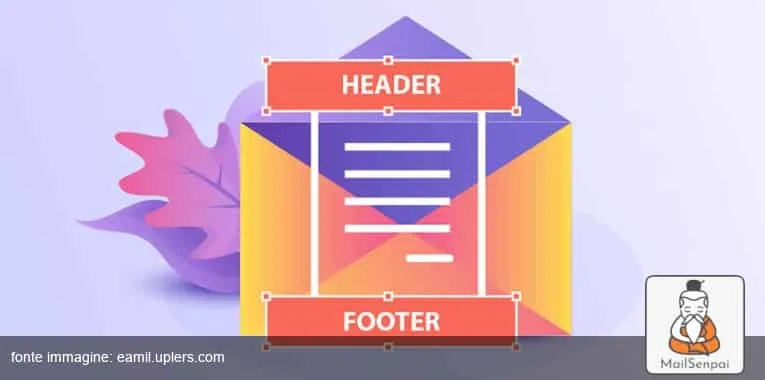
The email footerThe footer is the bottom section of a web page. Often overlooked, it is actually... More is the bottom section of an email message.
Webopedia.com
It contains information such as:
- Directions
- Unsubscribe links
- Website link
- Email address
- Phone number
- Company’s mailing address
Generally, the same information is used for all email marketing campaigns.
Marketers believe they’re your brand’s business card. You can use a footerThe footer is the bottom section of a web page. Often overlooked, it is actually... More in email to engage with your readers.
The Importance of Email Footer
Email footers are so valuable because:
- They look professional.
- They look sophisticated.
- Helps you make a good first impression.
- Helps you look trustworthy and genuine.
- Improve the quality of interaction with the recipients.
Types of Email Footers
Here are some of the most common types of email footers:
- Marketing Email Footers: Use them to promote sales, new blog posts, product launches, etc.
- Unsubscribe Links: Though you might not like it, adding an unsubscribe link is important. This helps you streamline your mailing listA mailing list is a list of contacts: a set of email addresses that regularly... More to people who are interested in receiving your emails.
- Social Media Buttons: This encourages your customers to interact with you on your social media channels.
- Green Email Footers: Add an environmentally conscious email disclaimer. This shows your customers that you’re an environmentally friendly business.
- Virus or Security Disclaimer: Include a security disclaimer if you often send attachments. This warns your customers to use a malware scanner.
- GDPR Compliant Footers: They help protect your business and help you follow industry standards. In addition, they help create more trust between you and your customers.
- Confidentiality and Legal Footers: They’re used to protect the confidentiality of your emails. In addition, they are used to protect the recipient’s identity.
10 Things to Include in Your Email Footer
Wondering how to create an email footerThe footer is the bottom section of a web page. Often overlooked, it is actually... More? Here are the top 10 things you should include in your email footerThe footer is the bottom section of a web page. Often overlooked, it is actually... More.
- Legal Information: Include your registered office address, privacy policy and terms and conditions. This helps your reader trust you more.
- Manage Preferences or Unsubscribe: This helps reduce your spamSpam is unwanted messaging: messages sent, often repeatedly, to recipients who never asked to receive... More score. When you give your reader the choice to unsubscribe, you allow them to make a choice. This helps them feel in control. They’re less likely to mark your emails as spamSpam is unwanted messaging: messages sent, often repeatedly, to recipients who never asked to receive... More.
- Social Proof: According to a Statista report, 30% of consumers believe that social proof influences their purchase decisions. Add reviews or ratings in your email footerThe footer is the bottom section of a web page. Often overlooked, it is actually... More. This helps build credibility and makes customers’ decision-making process simpler.
- Contact Options: It makes customers feel comfortable. They feel reassured that they can trust your brandA brand overlaps with a company's trademark, but its definition has more to do with... More.
- A Token of Thanks: express gratitude to your customers to warm their hearts. It also helps humanize your brandA brand overlaps with a company's trademark, but its definition has more to do with... More. Customers feel valued and are likely to purchase more often.
- Social Media Links: 70% of Americans use social media. They prefer buying from brands that have a strong social media presence.
- Your Brand’s Mission or Values: It serves as a reminder of what your business stands for. They feel good about knowing what they’re supporting when purchasing your products.
- Website/Blog Link: Helps the reader engaged and warms them up to your content.
- Referrals: Encourage happy customers to refer your product/service to their friends. Offer incentives like discounts and free products to increase sales.
- Encourage Them to Whitelist You: This prevents your email from landing in their spamSpam is unwanted messaging: messages sent, often repeatedly, to recipients who never asked to receive... More folder. Request them to add your email address in their email book. In addition, it helps boost email engagement.
Email Footer Design Best Practices
Here are a few email footerThe footer is the bottom section of a web page. Often overlooked, it is actually... More design best practices to consider before you start designing.
- Include Basic Information: Apart from adding social media buttons, legal links and unsubscribe links, include the reason you’re sending the email. This helps your customers understand why they are receiving your email.
- Have a Clear Structure and Hierarchy: Use separate contains for different types of information. Keep the graphic elements simple and sophisticated. This will help improve readability and promote engagement.
- Highlight The Links: Underline or highlight clickable links. Use contrasting backgrounds to improve email usability.
- Add More Useful Links: Improve links that you think will improve your customers’ reading experience. For instance: FAQs page, legal requirements, store locator, referral link, etc.
- Add Explanatory Details: If you’re offering limited-time deals. This boosts sales as customers want to avail discounts before they expire.
- Add Your LogoA logo, or logotype, is the graphic representation of the name … More: This helps your customers identify your brandA brand overlaps with a company's trademark, but its definition has more to do with... More. It also serves as a reminder and makes the footerThe footer is the bottom section of a web page. Often overlooked, it is actually... More appealing.
- Add Your Achievements: Include your achievements. You can also mention the awards you’ve won. This helps build trust between you and your customer.
- Add Download Buttons: This helps your customers easily download your app or softwareThe term software refers to the intangible components of an electronic system … More.
- Encourage Them to Rate The Email: This will help you improve your email marketing strategy. You will get instant feedback from your customers. You will understand the kind of content they’re interested in.
- Make it Personal: This will help you stand out from the crowd. Add a fun image, your favourite quote or a graphic element. Little things like these make the emails look human-like. This makes your customers feel like they’re interacting with a friend rather than an automated bot.
13 Email Footer Examples
Let’s see Here are 13 email footerThe footer is the bottom section of a web page. Often overlooked, it is actually... More examples:
#1. Patagonia Email Footer
They use icons with links to a few programs they run. Plus, links that direct their customers to their social media profiles. They also encourage their subscribers to use their preference center so that they can get the right kind of email.
#2. Alaska Airlines Email Footer
One of our favourite email footerThe footer is the bottom section of a web page. Often overlooked, it is actually... More examples is Alaska Airlines. They add a lot of personality to their footerThe footer is the bottom section of a web page. Often overlooked, it is actually... More in email. The unsubscribe link and contact information is clearly visible. They use the same colours and logoA logo, or logotype, is the graphic representation of the name … More in their footers. They also have a fun way of encouraging their subscribers to connect with them on social media.
#3. MiiR Email Footer
It’s a company that creates coffee cups and water bottles. Their footerThe footer is the bottom section of a web page. Often overlooked, it is actually... More is simple and has a clean design. But it delivers a powerful message. In addition, their unsubscribe message is nice and friendly. They highlight their company’s mission. It reminds the customers who they are and what they stand for.
#4. BANGS Shoes Email Footer
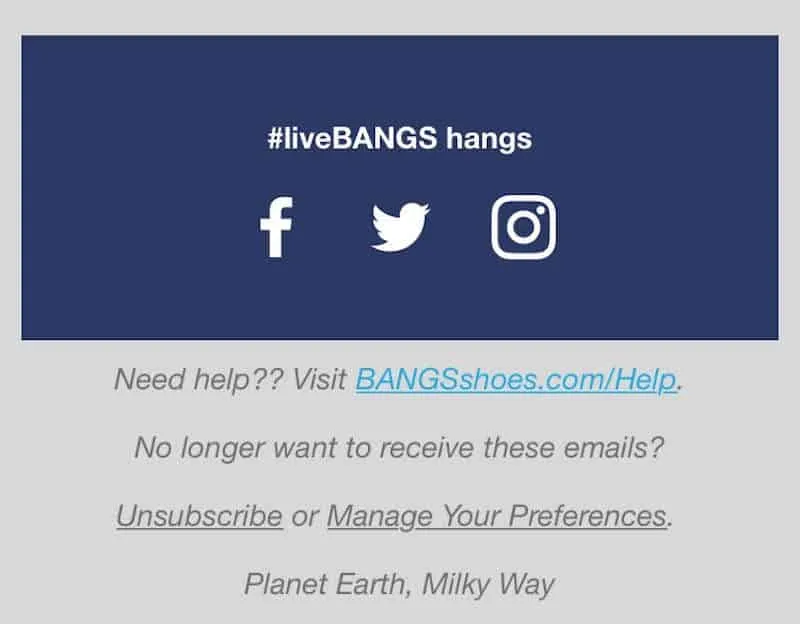
They like to keep their footers clean. Therefore, you’ll only find the most important information such as the unsubscribe and contact us link. This makes it easy for the customer to scan the footerThe footer is the bottom section of a web page. Often overlooked, it is actually... More. Since most of the footerThe footer is the bottom section of a web page. Often overlooked, it is actually... More contains plain text, it always renders correctly.
#5. WeTransfer Email Footer
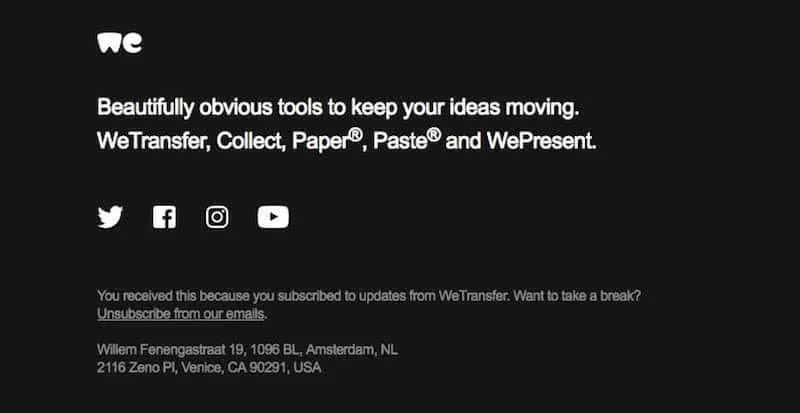
They use a clear structure and hierarchy in their footers. This provides clarity and direction to their subscribers. Firstly, the company clarifies what they do. Secondly, they add social media buttons. Finally, it links to the unsubscribe and manage preferences.
#6. Seletti Email Footer
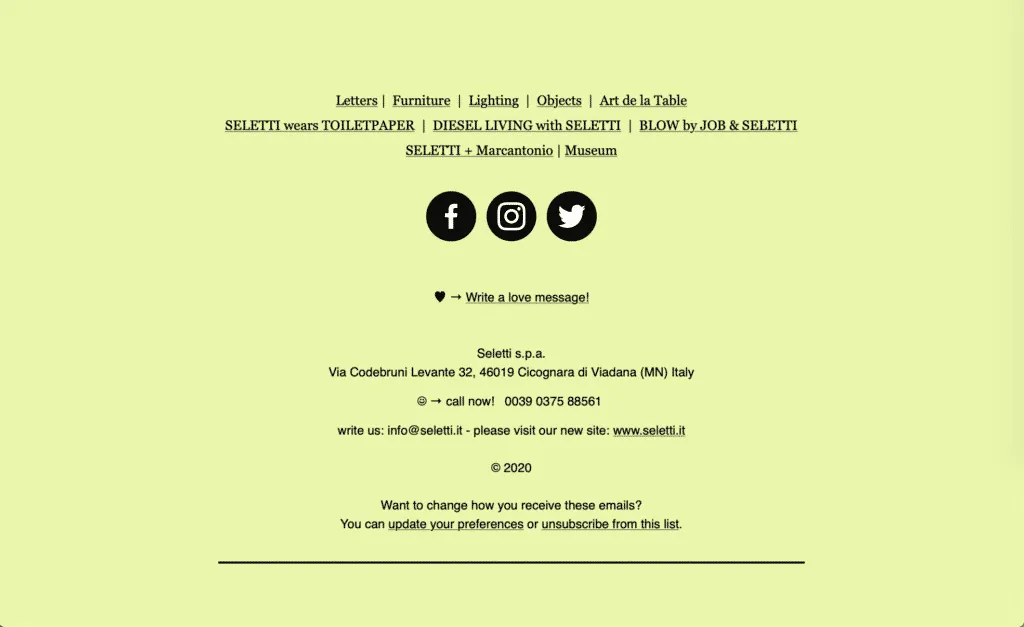
They use labels and headers to format their footerThe footer is the bottom section of a web page. Often overlooked, it is actually... More. This helps organize the content clearly and improves readability. The colour scheme is excellent and makes it easy to read. Emojis grab your subscriber’s attention and keep them hooked.
#7. Airbnb Email Footer
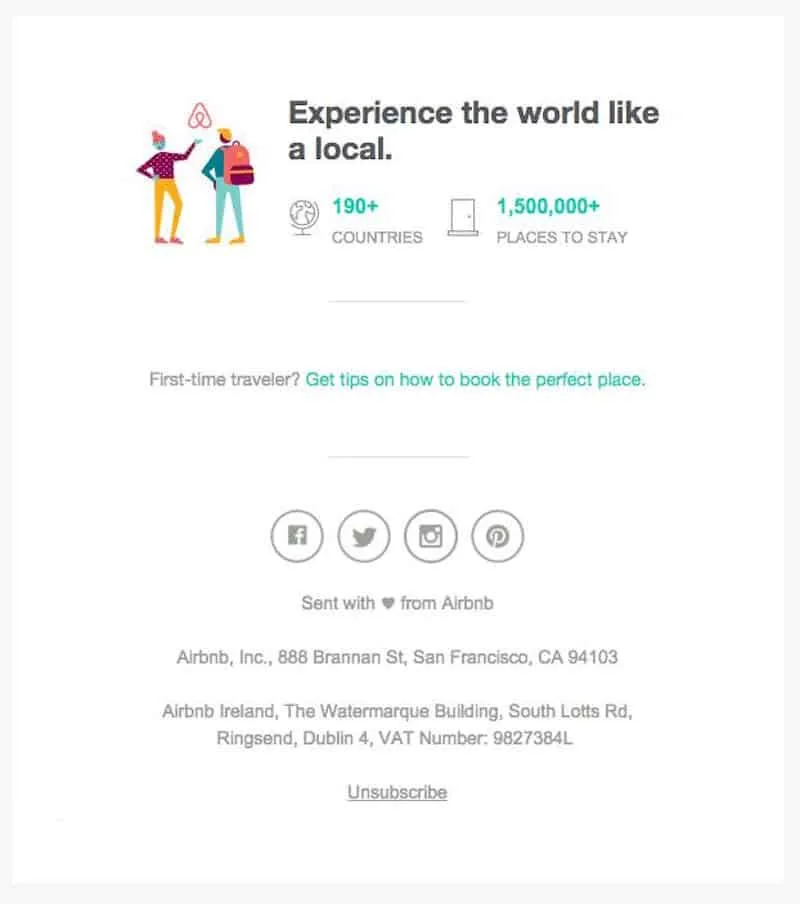
Another one of our favourite email footerThe footer is the bottom section of a web page. Often overlooked, it is actually... More examples is Airbnb. They use a large footerThe footer is the bottom section of a web page. Often overlooked, it is actually... More and add engaging content. Their design is clutter-free and easy to scan. It’s a clever but cute way of concluding an email without overwhelming their subscribers. They keep the text light and friendly. But they give big, blank spaces to improve scannability.
#8. Huckberry Email Footer
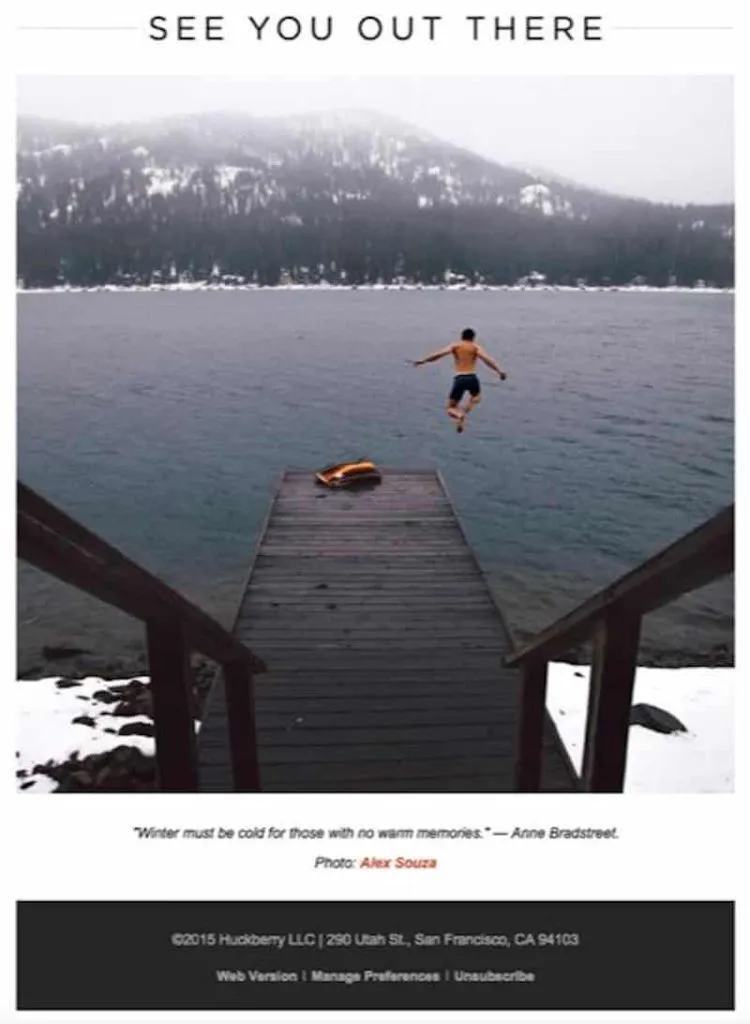
It’s a clothing brandA brand overlaps with a company's trademark, but its definition has more to do with... More that includes an inspirational quote in its email footerThe footer is the bottom section of a web page. Often overlooked, it is actually... More. It’s a fun way to include a signoff. A signoff is a great way to add a sense of playfulness and inspire readers. Their footerThe footer is the bottom section of a web page. Often overlooked, it is actually... More is to-the-point and elegant.
#9. Apple Email Footer
They add a menu in their footerThe footer is the bottom section of a web page. Often overlooked, it is actually... More. This keeps the reader from having to scroll back up to get the links they need to complete the purchase. They also include additional information about their products.
#10. FilterEasy
They use contrasting colours to set the footerThe footer is the bottom section of a web page. Often overlooked, it is actually... More apart. The use of bright colours grabs the reader’s attention and highlights the important information. This way, their referral program gets a lot of attention and increases their sales. We love the way they focus on customer support via different methods.
#11. Forever 21
Sure, their footerThe footer is the bottom section of a web page. Often overlooked, it is actually... More seems a little too much. But, we believe it works. First, they encourage the subscribers to shop through the links. Second, their shipping offers and payment options are clearly mentioned. Thirdly, well-spaced social media icons help generate trust. Lastly, they include the legal fine print.
#12. Grammarly
With social media icons and the reason why they’re sending the mail, they’ve kept their email footerThe footer is the bottom section of a web page. Often overlooked, it is actually... More simple. Their colour scheme is lovely and their spacing is excellent. Readers can change their email marketing preferences with ease. They can also unsubscribe or view the email via browser.
#13. Headspace
Their footerThe footer is the bottom section of a web page. Often overlooked, it is actually... More is professional and reassuring. They provide their subscribers with a way to contact them. In addition, they link to FAQs. They let their subscribers know that they’ll be able to talk to a real person during operating hours.
In Conclusion
Feeling inspired? Design your email footerThe footer is the bottom section of a web page. Often overlooked, it is actually... More now!
Your email footerThe footer is the bottom section of a web page. Often overlooked, it is actually... More is the last thing your subscribers see before exiting your email. Therefore, it’s important that you make it count. The email footerThe footer is the bottom section of a web page. Often overlooked, it is actually... More examples we included here are meant to inspire you to create your own footerThe footer is the bottom section of a web page. Often overlooked, it is actually... More. A little extra attention to your email footer’s content and design will make a huge difference.
Which email footerThe footer is the bottom section of a web page. Often overlooked, it is actually... More examples did you like the most and why? Tell us in the comments section below!
The MailSenpai team
We write practical guides on email marketing, email delivery and transactional sending, based on what we see every day on our platform.
Want the next guides in your inbox?
MailSenpai
Want to put these tips into practice?
Lists, templates, automations and reports in one platform, with an AI assistant that helps you write and schedule your campaigns.
MailSenpai
Try MailSenpai for free
Create your first campaign in minutes: lists, templates, automations and reports in one platform, with an AI assistant.