
In this article (7)
If Contact FormA form is a part of a web page that lets users enter information and... More 7 is not sending email, identify the failing stage first: field validation, spamSpam is unwanted messaging: messages sent, often repeatedly, to recipients who never asked to receive... More checks, notification generation or mail transport. Then inspect From, Reply-To and the recipient in the Mail tab. A different SMTP server can help with a transport problem; it does not automatically fix a submission rejected by the formA form is a part of a web page that lets users enter information and... More.

This guide covers transactional notifications from a WordPress contact formA form is a part of a web page that lets users enter information and... More. For installation, APIThe acronym API (short for Application Programming Interface) refers to a set of programming rules... More keys and relay settings, use the WordPress API/SMTP setup guide. Our contact form without a backend resource describes a different route; it is not Contact FormA form is a part of a web page that lets users enter information and... More 7 configuration.
Read the form status before changing the mailer
The official Contact Form 7 status reference separates these outcomes. Colours below refer to the default stylesheet; themes can change them, so record the actual status too.
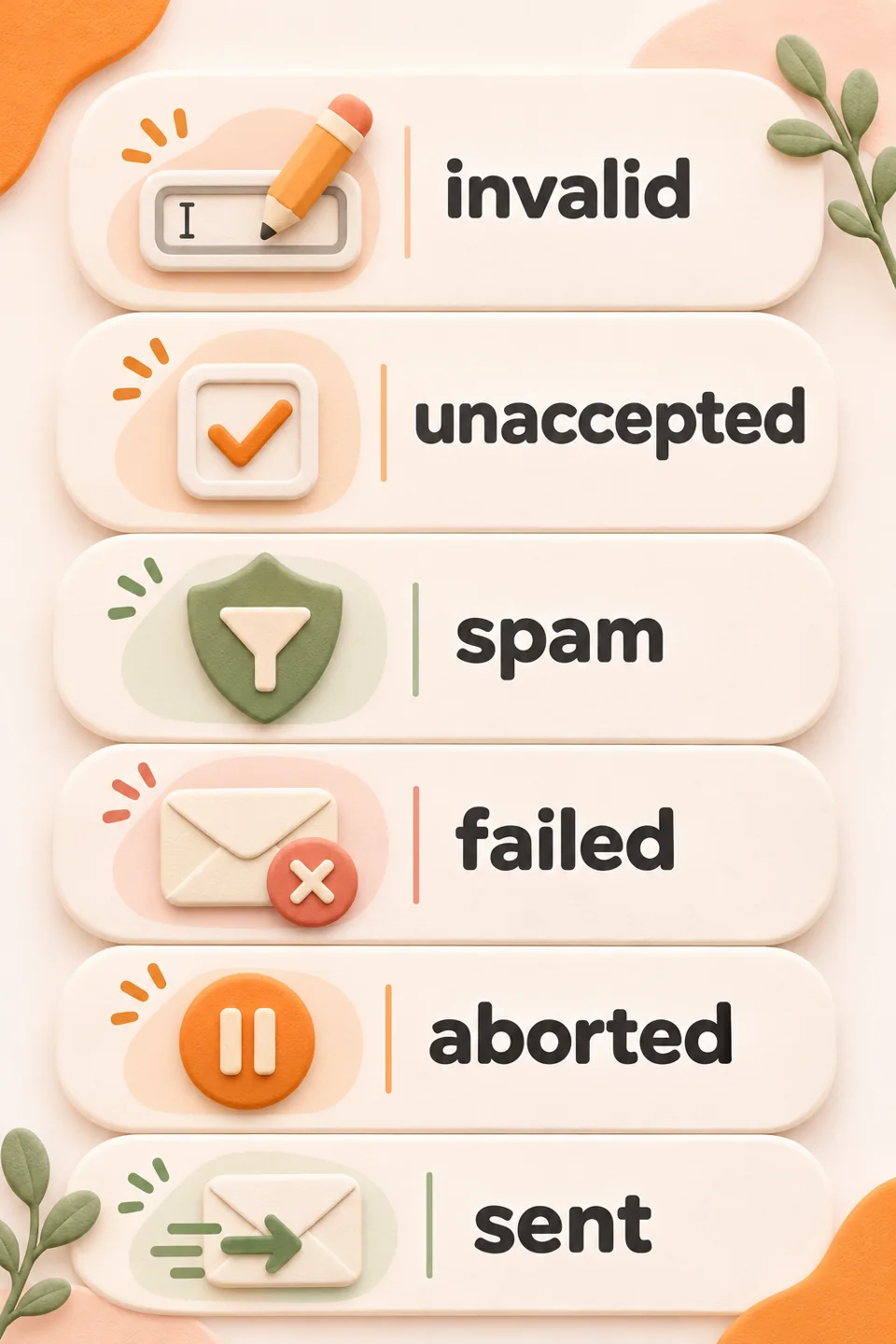
- invalid or unaccepted: input or a required condition stopped the submission. Resolve the indicated field first.
- spamSpam is unwanted messaging: messages sent, often repeatedly, to recipients who never asked to receive... More: a spamSpam is unwanted messaging: messages sent, often repeatedly, to recipients who never asked to receive... More check stopped the request, normally with an orange border. Review that check with the person managing the formA form is a part of a web page that lets users enter information and... More.
- failed or aborted: the default border is red. Read the detail rather than treating failed sending and an interrupted workflow as one diagnosis.
- sent: the application reported success. Continue with receipt checks; this is not an inbox-placement result.
Illustrative case: the mailer’s test succeeds while a formA form is a part of a web page that lets users enter information and... More submission returns spam. Those are different stages. Review formA form is a part of a web page that lets users enter information and... More protection and its logs rather than rotating credentials or switching off protections indiscriminately. The official FAQ explains why a generic error message may accompany different failures.
Give From, To and Reply-To separate jobs
Open the relevant formA form is a part of a web page that lets users enter information and... More under Contact → Contact Forms, then select Mail. The official sender guidance recommends From on the website’s domainIn technical terms, a domain name is the address used to visit a specific website.... More. SMTP Senpai also requires an authorised sender on a verified domainIn technical terms, a domain name is the address used to visit a specific website.... More. To is the mailbox receiving the enquiry; Reply-To can point to the visitor’s email field.

Do not make the visitor’s Gmail address your From address. If the transport pluginThe term plugin (also called an extension or add-on) comes from computing. It refers to... More forces From, inspect the final received header. Prepare a monitored mailbox if you need replies: an SMTP/API relay provides transport rather than replacing your inbox.
A consistent example to adapt
Demonstration only: this is neither a live formA form is a part of a web page that lets users enter information and... More nor a tested delivery. You can define these fields in the FormA form is a part of a web page that lets users enter information and... More template. Use matching mail-tags in the Mail tab:

<label>Name [text* your-name]</label>
<label>Email [email* your-email]</label>
<label>Message [textarea* your-message]</label>
[submit "Send enquiry"]
For a demonstration website on example.com, the corresponding Mail settings could be:
To: [email protected]
From: Demo website <[email protected]>
Subject: New website enquiry
Additional headers:
Reply-To: [your-email]

Message body:
Name: [your-name]
Email: [your-email]
Message: [your-message]
These are placeholder addresses: replace them with your domainIn technical terms, a domain name is the address used to visit a specific website.... More and controlled mailboxes. [your-email] must match a real email field in your FormA form is a part of a web page that lets users enter information and... More template. The Mail tab documentation separates recipient, sender, additional headers and message body. SMTP passwords and APIThe acronym API (short for Application Programming Interface) refers to a set of programming rules... More keys do not belong in these fields.
The form reports success, but no message arrives
A true return value from WordPress wp_mail() means the method processed the request without reporting an error, not that a mailbox received it. Match the pluginThe term plugin (also called an extension or add-on) comes from computing. It refers to... More result, sending-service log and recipient mailbox by timestamp, recipient and available message identifier. Relay acceptance, recipient-server acceptance and inbox placement are different evidence.
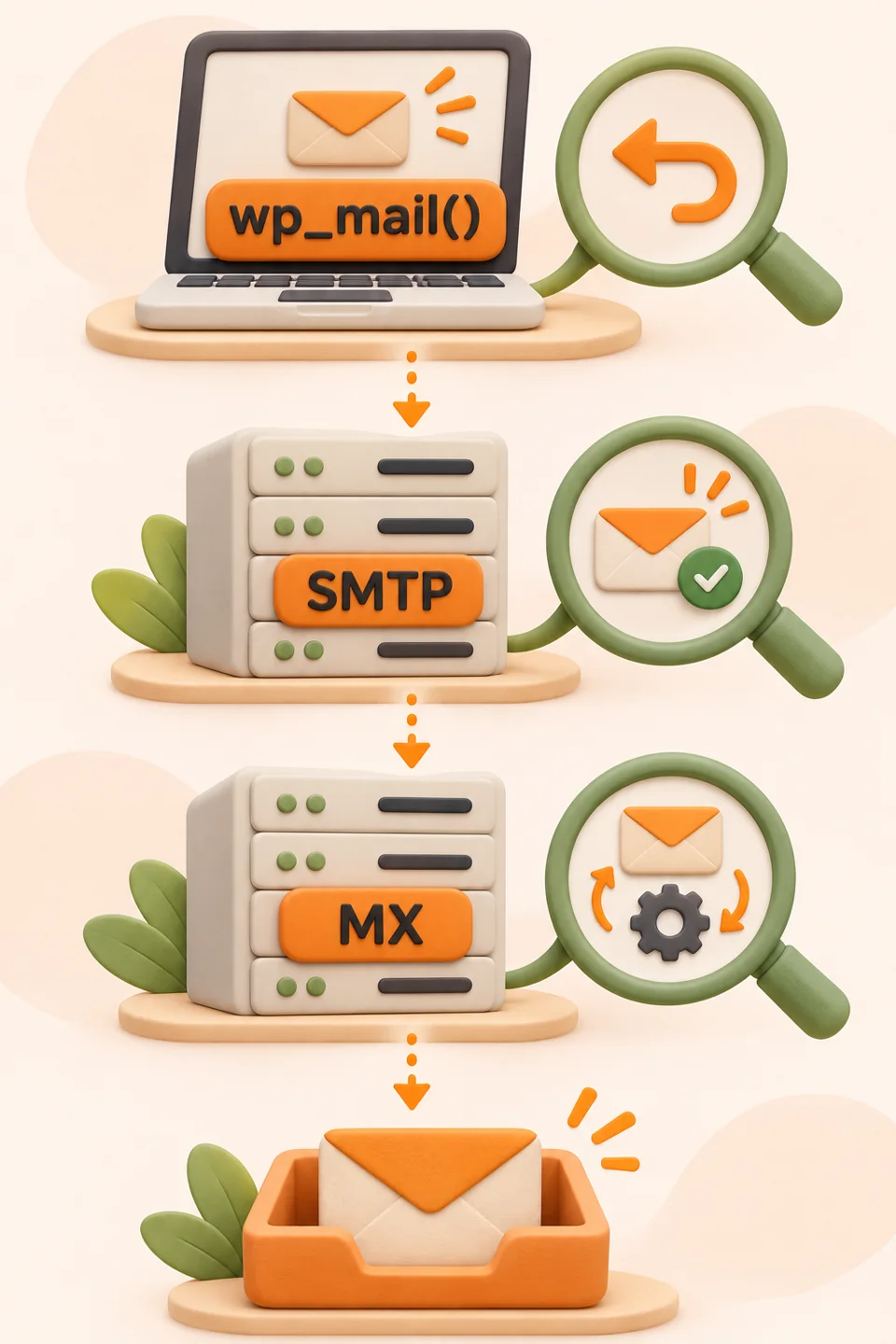
Check Additional Settings for leftover demo_mode: on or skip_mail: on: these settings can skip sending. Do not enable them as a delivery fix. A success notice does not automatically give you a reliable message archive; separately verify whatever recording process your site already uses.
When to check API, SMTP and sender authentication
If the request reaches the mailer and transport returns an error, read the full reason. Connectivity, authentication, sender authorisation, volume and recipient problems need different checks. SMTP Senpai offers HTTPS APIThe acronym API (short for Application Programming Interface) refers to a set of programming rules... More keys or a STARTTLS relay; see WordPress configuration. Use the email DNS checker for sender records and the 554 5.7.1 diagnostic guide for policy refusals.
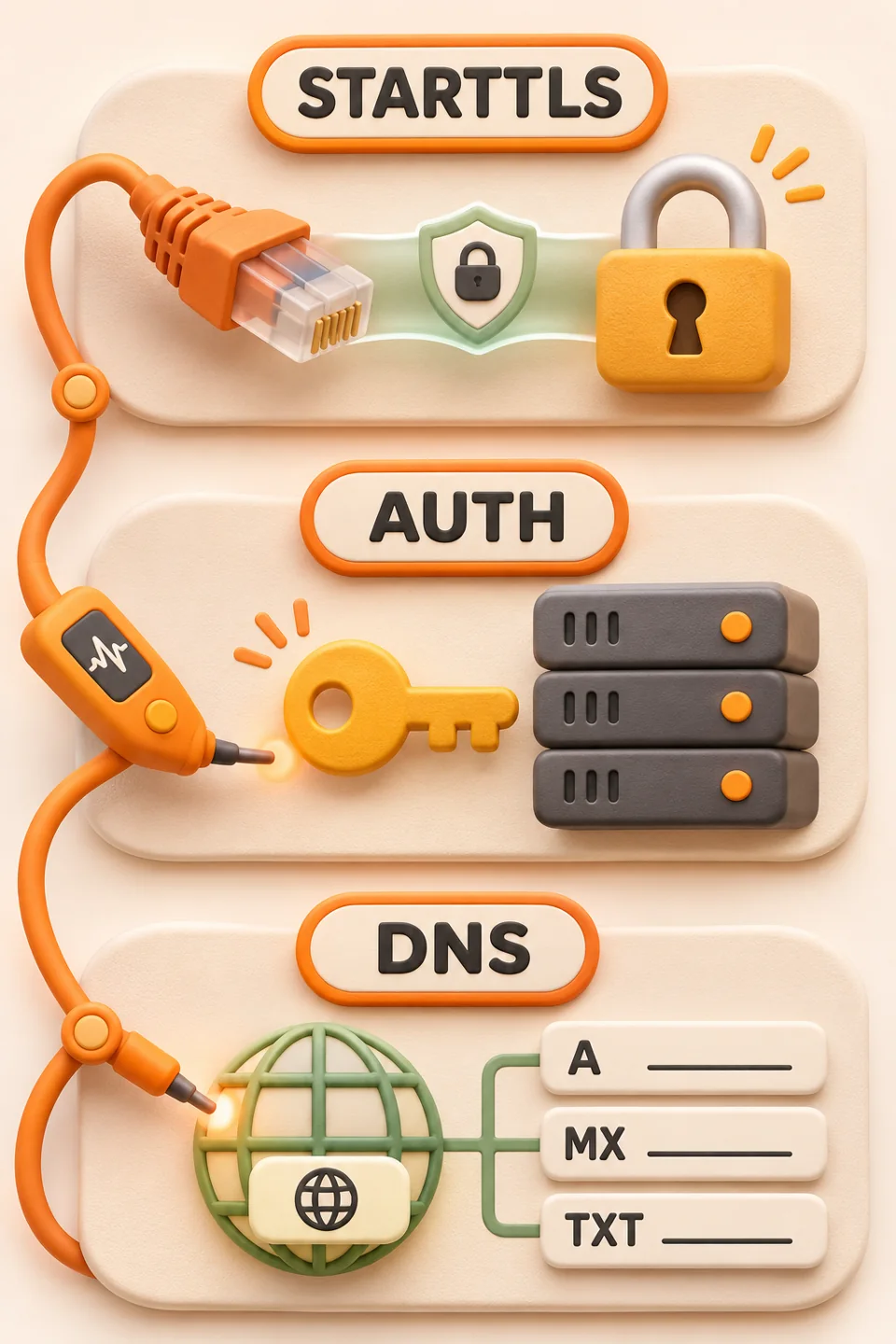
SMTP Senpai is for transactional email only. Its free plan has no card requirement or expiry, with 5,000 emails per calendar month, 200 per day, 30 in the preceding hour, one verified sender domainIn technical terms, a domain name is the address used to visit a specific website.... More and seven-day service logs. Newsletters and promotional campaigns belong to the separate MailSenpai platform. No transport guarantees inbox placement.
Verify the route without losing the next enquiry
- Start on staging, preserve the current configuration and use demonstration data and a mailbox you control.
- Check that required fields produce understandable validation messages. Investigate any spamSpam is unwanted messaging: messages sent, often repeatedly, to recipients who never asked to receive... More outcome through the responsible protection; do not bypass it.
- When you perform an authorised test, compare the actual formA form is a part of a web page that lets users enter information and... More notification with transport logs and the received message. A standalone mailer test is insufficient.
- Check Reply-To by replying from your own mailbox. Record WordPress/plugin versions, method, time and outcome. Share only necessary, sanitised diagnostics with support.
If the spinner never finishes, have the form’s JavaScript errors and requests inspected too; the problem may be before transport. The official DOM events separate validation, spamSpam is unwanted messaging: messages sent, often repeatedly, to recipients who never asked to receive... More, failed mail and sent mail. The generic wpcf7submit event does not certify receipt. Review existing measurement carefully instead of counting a button click as an acquired contact.

Frequently asked questions
Not necessarily. The default stylesheet uses it for a spamSpam is unwanted messaging: messages sent, often repeatedly, to recipients who never asked to receive... More outcome. Check the formA form is a part of a web page that lets users enter information and... More status and responsible protection; changing the relay does not automatically fix that stage.
For this setup, keep From on the website domainIn technical terms, a domain name is the address used to visit a specific website.... More and authorised by the sending service. Put the visitor tagA tag is, quite literally, a label: a word (or alphanumeric code) that acts as... More in Reply-To and make sure it matches a real email field in the formA form is a part of a web page that lets users enter information and... More.
No. Match the application result to service logs and the recipient mailbox. Also check for settings that intentionally skip mail.
Transport configuration is separate. Verify the form's wp_mail route and use one mailer for that route. This guide does not claim a new runtime test or compatibility across every version.
Official sources checked on 13 November 2026. Examples and the route diagram are illustrative. No customer data, actual delivery result or version-specific runtime test is presented as work performed for this article.
The MailSenpai team
We write practical guides on email marketing, email delivery and transactional sending, based on what we see every day on our platform.
Want the next guides in your inbox?
MailSenpai
Want to put these tips into practice?
Lists, templates, automations and reports in one platform, with an AI assistant that helps you write and schedule your campaigns.
MailSenpai
Try MailSenpai for free
Create your first campaign in minutes: lists, templates, automations and reports in one platform, with an AI assistant.